During The Match
Live Scoring
The live screen is designed for two real courtside jobs: simple scorekeeping when the match is moving fast, and player-level stat tracking when you have time to enter the rally cleanly.
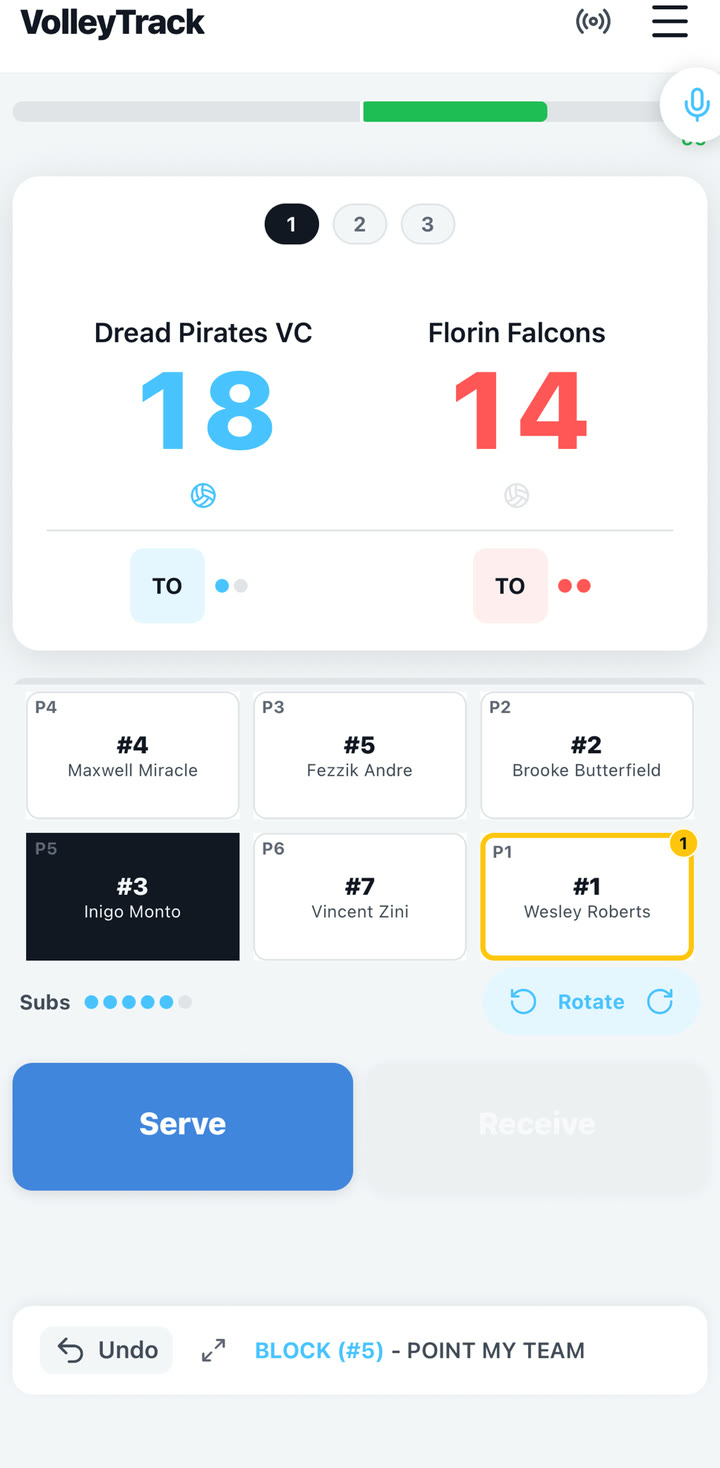
Score-only rallies
- Tap the side that won the point.
- Let VolleyTrack update the score and serving team. When your team wins serve back, the tracked lineup rotates automatically.
- Use this path when preserving the scoreboard matters more than recording the full stat sequence.
If you start a Quick Match in Just Score mode with no roster, VolleyTrack hides the lineup cards, stat grid, substitutions, and voice input. That mode is intentionally focused on score, serve, and timeouts.
Stat-tracked rallies
Do not tap the score first when you want player stats. Start with the player cards, then choose the action and rating so VolleyTrack can update the score from the result.
- Serve: When your team serves, the P1 server is selected for you. Tap Serve, then choose Ace, Good, or Error.
- Receive: When the opponent serves, select the passer first. Tap Receive, then choose 3 Perfect, 2 Good, 1 Poor, Error No Point, or Error Point.
- Attack: Select the setter first and the attacker second. Tap Attack, then choose Kill, Good, or Error.
- Block: Select the blocker, then tap Block. A block immediately awards your team a point.
- Dig: Select the defender, then tap Dig. A dig keeps the rally moving and does not change the score.
- Error: During a rally, tap Error and choose Drop, Passing Error, or Setting Error. These award the point to the opponent.
Side-outs and rotation
If the rally creates a side-out, VolleyTrack changes the serving team and advances your rotation when your team wins serve back. If a libero would rotate to the front row, the app can automatically swap the libero out according to the saved pairing.
Timeouts
Tap the TO control under the team calling timeout. VolleyTrack tracks remaining timeouts for the set with dots under each team and disables the button at zero. Timeout counts reset for each set from the match rules.
Substitutions
The live Subs row shows your team's remaining substitutions for the set. Long-press an occupied live court card to open the substitute sheet; tapping a player card selects that player for stats.
Use undo correctly
Undo is intended for the most recent current-set action. It should restore score, serving team, rally state, rotation, substitutions, timeouts, libero/sub pairing state, and any immediate side-out rotation or libero auto-swap from that action.
Correct the score
Long-press the score to correct the number when the scoreboard and real match diverge. Score correction does not recalculate serving team, rally state, rotation, or history, so use it for the score only.
End sets deliberately
When a set reaches the target, choose the correct modal action: Keep Playing to close the modal only, Correct Score to return to the live screen and edit the score, Start Next Set to advance, or Finish Match to end the match.